Browse the docs
Docs›Working on X
Reply radar: find posts worth a reply FREEPRO
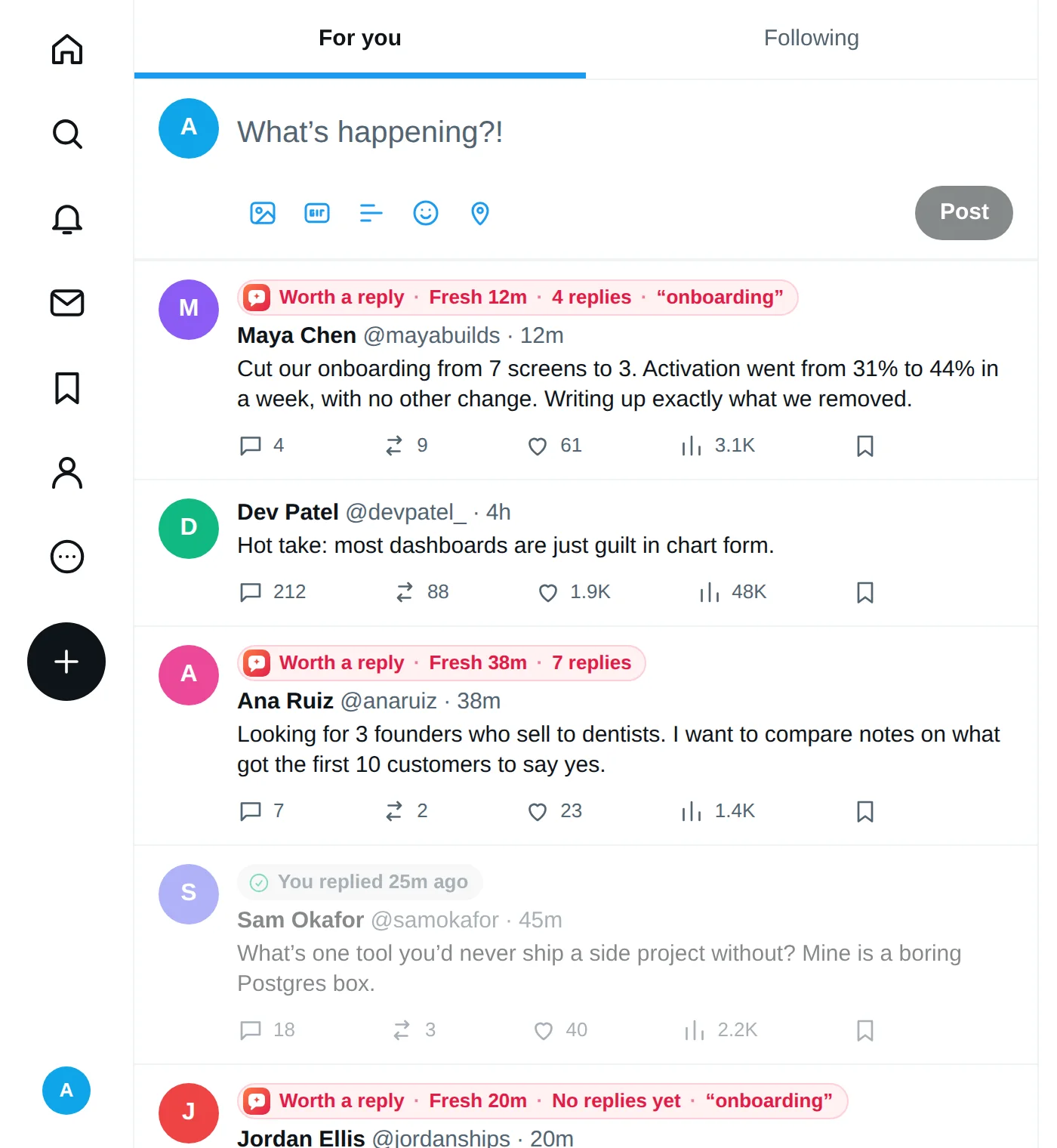
While you scroll X, a small “Worth a reply” badge marks posts on your screen worth answering and says why: fresh, few replies, reach or your keywords.
Free, with more on ProAdded in 2.23.0Settings › Reply radar
Pro: $7.99 a month or $49 a yearHow to use it
- 1Scroll Home, a List or Search on x.com. Posts already on your screen that match get a “Worth a reply” badge above them, naming the reasons.
- 2The rules: Fresh (posted in the last hour), Few replies (fewer than 20), Reach (at least 10K views), Your keywords, and Your watchlist. By default a post needs 2 of them; hover the badge to see each rule.
- 3Click the badge: X-Reply takes you to the post’s Reply button. Press Enter or click it, then use AI reply as usual. X-Reply never clicks anything for you.
- 4Posts you already added an X-Reply draft to are dimmed (“You replied 25m ago”).
- 5Settings › Reply radar sets the keywords, watchlist and rules, or turns the radar off. Free has a 3-account watchlist; Pro adds the other rules, 25 accounts and dimming.
See it in action · 0:11On a demo X page with made-up people. Nothing is posted.
- Scroll your home timeline
- Radar marks the posts worth replying to now
- Click a badge, press Enter, then draft with AI reply
If something goes wrong
- No badges at all
- Check that Settings › Reply radar › Show the radar on x.com is on, and that the rules aren’t too strict: try “Any rule matches”. On Free, only posts by your watchlist get a badge.
- A post I answered isn’t dimmed
- Dimming is part of Pro, and counts only replies that started as an X-Reply draft.
Still stuck? Help and contact.