Browse the docs
Docs›Writing replies
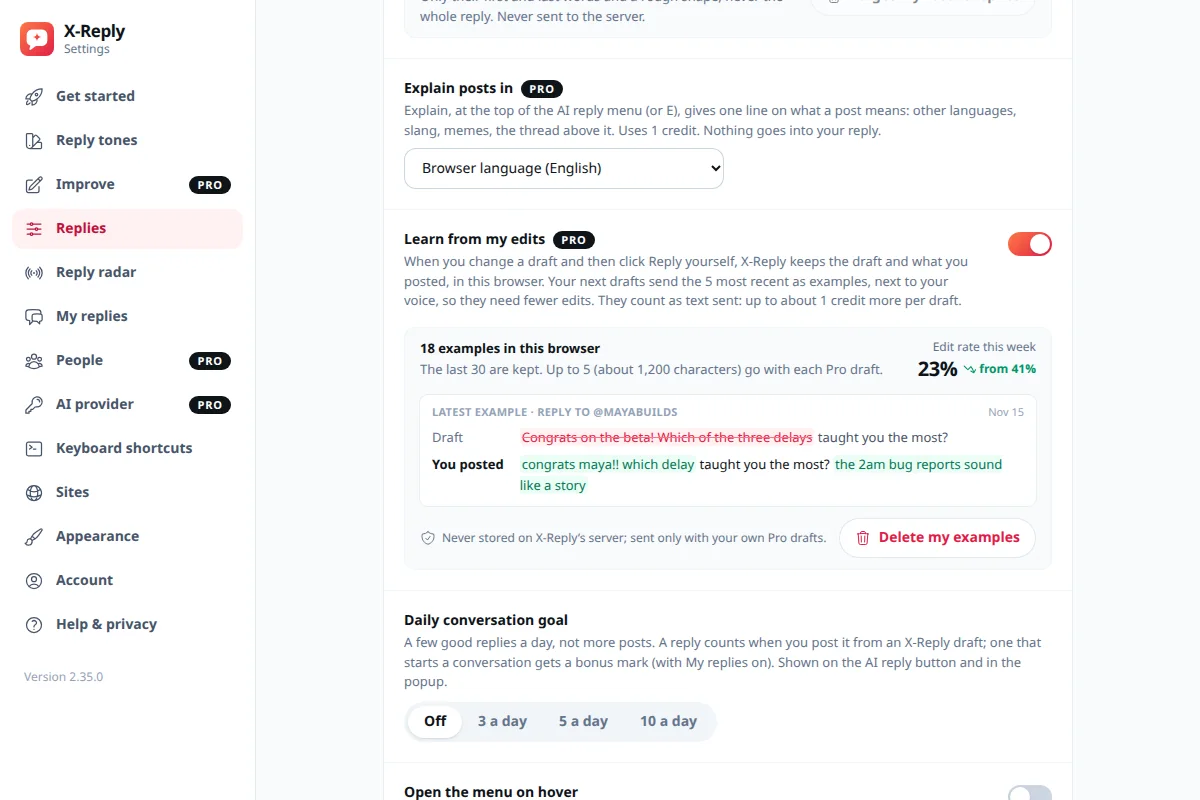
Learn from my edits PRO
Turn it on and X-Reply learns from how you change its drafts before posting, so the next drafts need fewer edits. It is off until you do.
Part of X-Reply ProAdded in 2.26.0Settings › Replies › Learn from my edits
Pro: $7.99 a month or $49 a yearHow to use it
- 1Turn on Settings › Replies › Learn from my edits.
- 2When you change an X-Reply draft and then post it with X’s own Reply button, X-Reply keeps the draft and what you posted, in this browser (the last 30).
- 3Each Pro draft then sends the 5 most recent from the same X account (about 1,200 characters) as examples, next to your voice. They count as text sent: up to about 1 credit more per draft.
- 4The popup’s Progress tab shows your edit rate: how much of each draft you changed before posting, this week and over 6 weeks. It should fall as the drafts learn.
- 5Settings › Replies shows the latest example; Delete my examples removes them all.
See it in action · 0:12On a demo X page with made-up people. Nothing is posted.
- Turn on Learn from my edits in Settings › Replies
- Change a draft on X before you post it
- Your changes shape the next drafts
What is sent where
Up to 5 of your recent draft and posted-reply pairs go with each Pro draft to X-Reply’s server and OpenAI (or your own key’s provider). They are never stored on X-Reply’s server; the pairs stay in this browser.
More in What is sent where and the privacy policy.
If something goes wrong
- The switch is greyed out
- Learn from my edits is part of Pro. When Pro ends, the examples stay in this browser, aren’t sent, and can still be deleted.
- Nothing is being learned
- Only replies you post with X’s own Reply button, from an X-Reply draft you changed, count. Replies you write from scratch don’t.
Still stuck? Help and contact.