Browse the docs
Docs›More
App language: X-Reply in 16 languages FREE
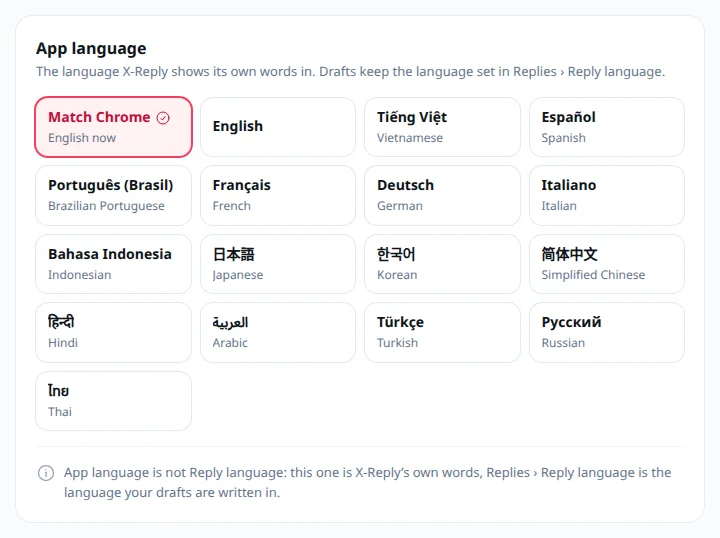
Show X-Reply’s own words in your language: Match Chrome, or one of 16 languages. Your drafts keep their own Reply language.
Free for everyoneAdded in 2.34.0Settings › Appearance › App language
Step by step
- 1Open Settings › Appearance (the gear in X-Reply’s popup, then Appearance in the list; the popup’s “Language” link goes straight there).
- 2Pick a language: English, Tiếng Việt, Español, Português (Brasil), Français, Deutsch, Italiano, Bahasa Indonesia, 日本語, 한국어, 简体中文, हिन्दी, العربية, Türkçe, Русский or ไทย. Match Chrome, the default, uses your browser’s language when it is one of these, else English.
- 3X-Reply switches at once, with no reload: the menu, cards and notes on X and LinkedIn, the toolbar popup, the welcome page and every Settings page (since 2.35), including the tone and improvement editors, model names, help answers and messages. Arabic reads right to left. Where X-Reply names one of X’s buttons, it uses X’s own word for it in that language. The choice follows your Chrome profile to your other computers.
- 4App language is not Reply language: your drafts are still written in the language set in Settings › Replies › Reply language (or the post’s language).
See it in action · 0:07On a demo X page with made-up people. Nothing is posted.
- Open Settings › Appearance › App language
- Pick a language
- X-Reply switches at once, no reload
If something goes wrong
- A few words stay in English
- On purpose: X-Reply, Pro, provider and model names (gpt-4o-mini), key names, your own tones and improvements, and what is sent to the AI. In 2.34 only the popup, the welcome page, Appearance and X and LinkedIn were translated; update to 2.35 for every Settings page.
- My drafts came out in the app language
- They follow Settings › Replies › Reply language, not the app language. Set it to the language you want, or leave it on the post’s language.
Still stuck? Help and contact.