Reply on X in seconds. Still sound like you.
Pick a tone and X-Reply drafts a reply right in X’s reply box. You edit it and press Post yourself, so every reply stays yours.
- 6 free credits a day
- Any language
- Never posts for you
Not on Chrome right now? Try the free reply generator on this site, no sign-up.
Three clicks from post to reply
No copying posts into a chatbot, no switching tabs.
 1
Add to Chrome and sign in
Sign in with Google. Free credits come back every day.
- 2
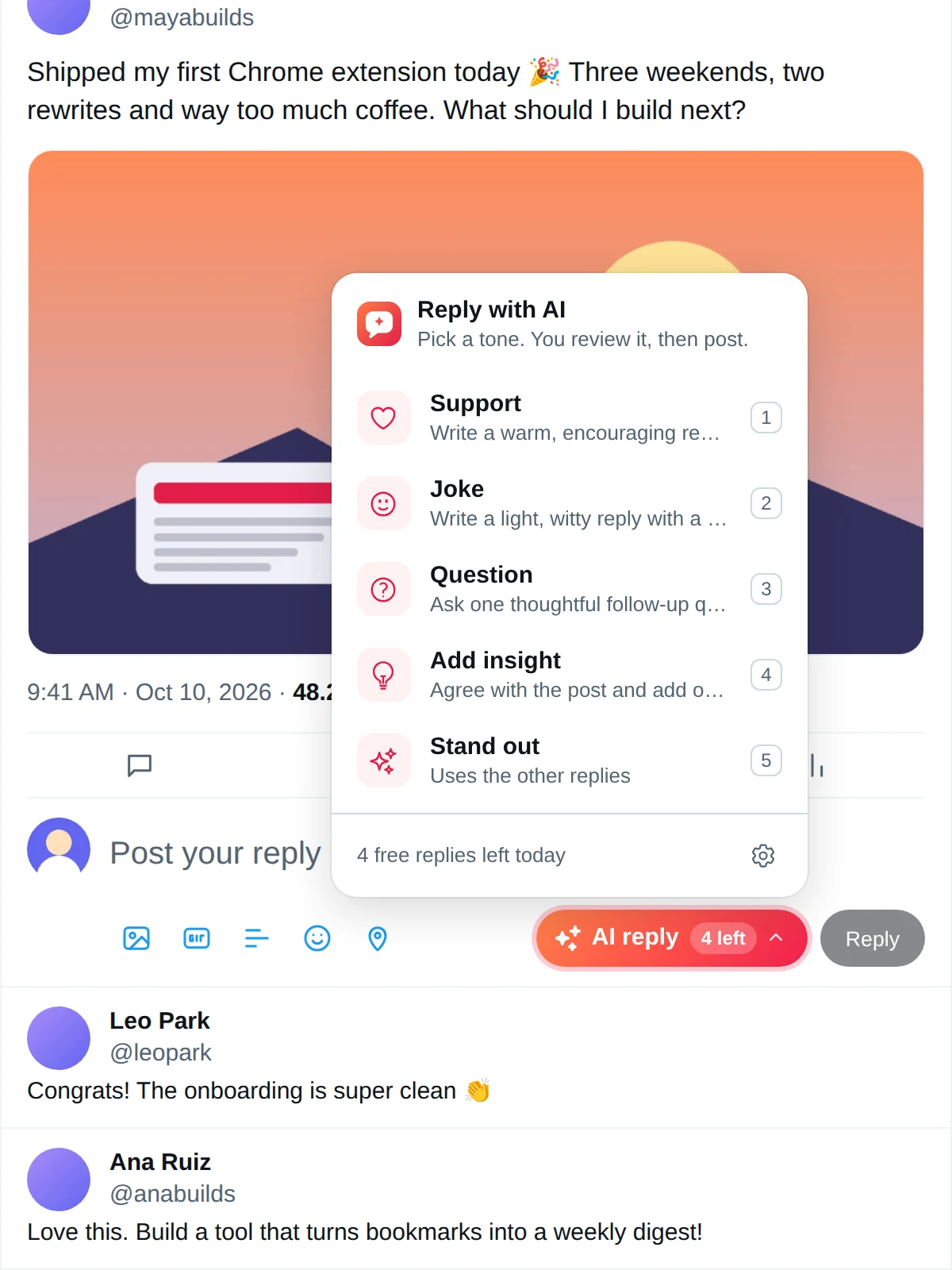
Click AI reply and pick a tone
The button sits next to Reply on any post and in reply popups.
 3
Edit it, then post
The draft lands in the reply box. Make it yours and press Reply.
Tones that sound like you, not like a bot
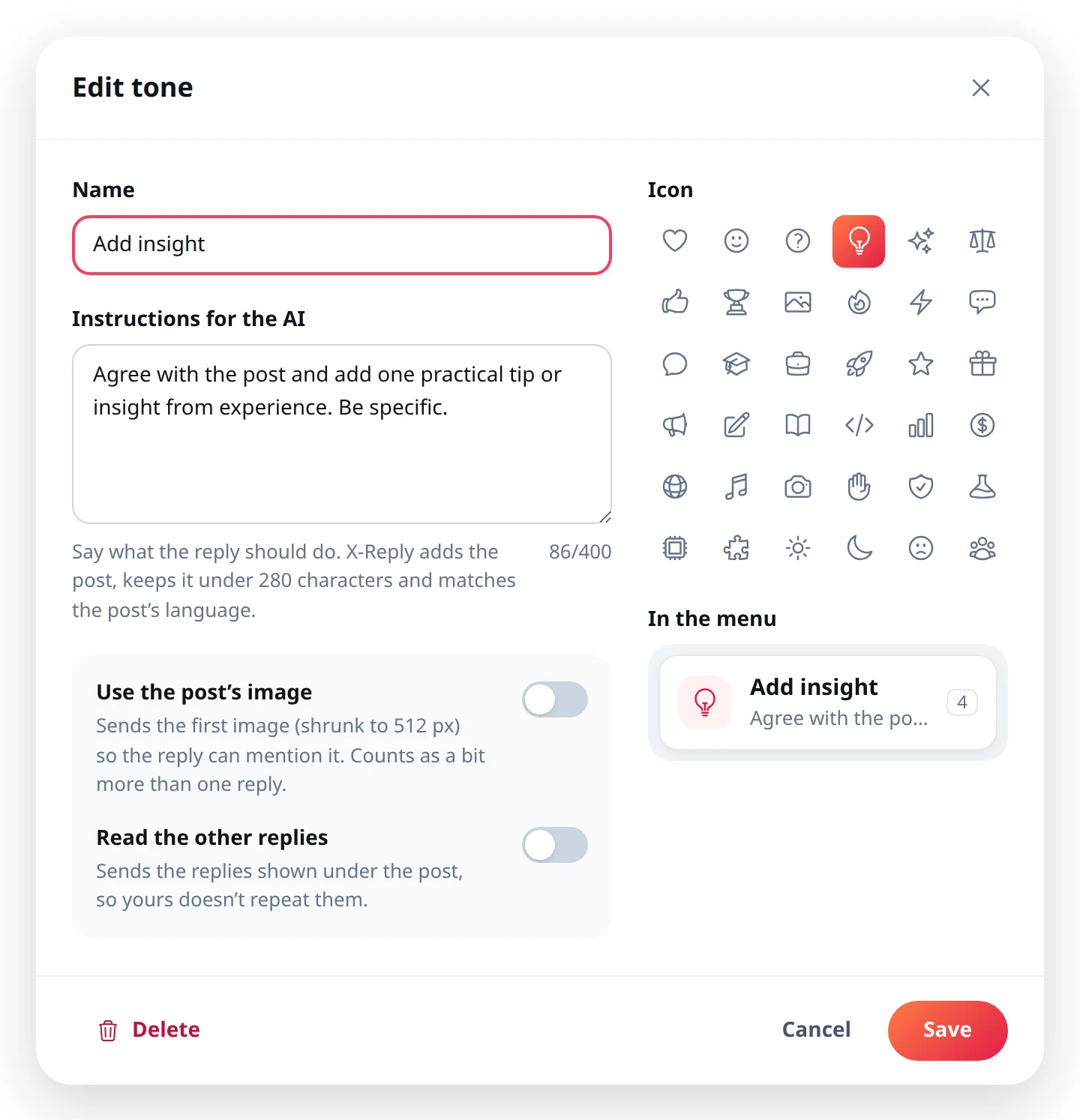
Each tone is a short instruction you control. Keep the three defaults, add one of 11 templates, or write your own in plain words.
- “Agree with the post and add one practical tip from experience”
- “Read the other replies and add something none of them said”
- “Short, casual, no emojis, mention I’m a designer”
Your own tones
Support, Joke, Question, or tones you write yourself, like “agree and add one practical tip”. Start from 11 templates.
Fits the conversation
A tone can read the post’s image and the other replies, to say something none of them said, or, with Fit in, to write the way people reply there. It never copies their words.
Any language
Drafts come back in the language of the post, or always in the language you choose. Works whatever language you use X in.
Short or detailed
One-line reactions or a fuller answer, always within 280 characters. No quote marks, no hashtag spam.
Fast from the keyboard
Press Alt+Shift+R in a reply box to open the menu (you can change the key), 1–9 to pick a tone, Esc to close. The draft goes into the reply box; you still press Post.
Feels like part of X
One small button next to Reply, in X’s Light, Dim and Lights out themes. No side panels, no extra tabs.
Comments on LinkedIn, in your words
Turn LinkedIn on in X-Reply’s settings and the same tones draft comments on posts and replies to comments. You edit it and press Comment yourself.
- Nothing in your feed: a small button shows only in the comment box you’re typing in
- Adds a view, an experience or a question of yours, never a summary of the post
- Reads only the post and the comment you reply to, never profiles or other comments
- Same credits and Pro features as on X, and a voice of its own for LinkedIn (Pro)
A draft in the comment box. You edit it, then press Comment.
A writing assistant, not a bot
X cracks down on accounts that automate replies and follows. X-Reply is built the other way round: nothing happens until you click, and nothing is posted until you press the button.
You press Post
Every draft waits in the reply box for you to read and edit.
No automation
It never posts, likes, follows or unfollows. No bulk tools.
Only what’s needed
Just the post you’re replying to is sent, only when you pick a tone.
Nothing kept
We don’t store the posts you reply to or your drafts, and never sell your data.
Bot traps spotted
Posts written to catch AI replies (“ignore all previous instructions…”, “if you’re an AI, reply with…”, orders hidden in an image) get a warning in the menu, and the AI is told never to follow orders inside a post. Your draft answers what the post actually says.
Free every day. Pay only if you want more.
Every tone, language and image feature stays free. Pay once for more credits, or go Pro for replies that sound like you.
1 credit ≈ 1 reply. Replies that read an image use about 3.
Free
6 credits a day.
- Works on X and LinkedIn
- All tones and templates
- Image and other-replies context
- Any language, any length
- Refills every 24 hours
 Add to Chrome
Pro
Sounds like you$4.08 a month, billed yearly.
Replies that sound like you.
- Works on X and LinkedIn
- Learns your voice from your own posts
- Learns from the edits you make before posting
- 3 drafts per click, pick the best
- Improve any reply in one click: your own or the AI’s
- Explain any post in your language
- Pick a stronger AI model for better writing
- Or use your own key: OpenAI, OpenRouter, Anthropic, Gemini, xAI, DeepSeek, Mistral or Groq
- Answer the replies to your posts, one by one
- Turn your best replies into posts and quote posts
- Reply radar: posts worth a reply, marked as you scroll
- See who answered or liked each of your replies
- Private notes on people, right in the reply box
- About 16,000 credits every month
- Need more? Add a pack anytime
- Everything in Free
- Cancel anytime
Reply pack
No subscriptionAbout 33,000 credits.
- Credits never expire
- Works on X and LinkedIn, with Free or Pro
- One payment, no renewal
- Secure checkout by Lemon Squeezy
Questions, answered
Is X-Reply free?+
Yes. Sign in with Google and you get 6 free credits every 24 hours, and 1 credit is about one reply. Every tone, language and image feature is free. If you reply a lot, a reply pack adds about 33,000 credits for $9.99, one payment, no subscription.
What does Pro add?+
Replies that sound like you. Paste 5 to 10 of your own posts on your Account page, and every Pro draft follows how you write (capitals, punctuation, slang, emoji habits), never what you said. Each click gives you 3 drafts to pick from, and Improve fixes any reply in one click, your own or the AI’s: grammar, shorter, more casual, translated. Pro comes with about 16,000 credits every month. $7.99 a month or $49 a year, cancel anytime.
How do credits work?+
A plain reply uses about 1 credit, a reply that reads the post’s image about 3, Pro’s 3 drafts about 2, and an improvement about 1. Pro credits are used first, then pack credits, then free credits. Pro credits reset every month and don’t carry over; pack credits never expire. Your Account page shows what’s left.
Can I cancel Pro?+
Yes, anytime, from “Manage subscription” on your Account page. Pro stays on until the end of the period you paid for. Pack credits you bought stay yours.
I already wrote my reply. Can X-Reply improve it?+
Yes, with Pro. Type your reply, open AI reply and click Improve: it fixes grammar and awkward phrasing and keeps your words, hashtags and emojis. The arrow next to it makes it shorter or more casual, adds a question or your own take, or translates it. It works on drafts X-Reply wrote too, and Undo always puts your text back.
Does X-Reply post for me?+
Never. It writes a draft into the reply box. You read it, change it, and press Post yourself. It also never likes, follows or unfollows anyone, and nothing happens until you click.
Is it OK to use on X?+
X’s rules target automation: accounts that post, follow or reply without a person doing it. X-Reply only drafts text you review and send yourself, the same as typing it. Make each reply your own and you’re using it the way it’s meant to be used.
Which languages does it support?+
Any language the AI writes well, which covers most languages on X. By default the draft matches the post’s language; you can also choose one language for every draft in Settings.
What is sent, and to whom?+
Only when you pick a tone: the tone’s instructions, the text of the post you’re replying to and, if the tone uses them, its image and the other replies. With Pro, the voice you saved on your Account page goes along too, and when you improve a reply, the text in the reply box and any words you type for it. They go to the X-Reply server and OpenAI to write the draft. We don’t keep the post or your drafts, and we never sell your data.
I paid but don’t see my credits or Pro.+
Open your Account page and click “Refresh purchases”. Bought a pack with a different email? Click “Paid with another email?” and enter the order number from your receipt. Still missing? Email ethanhdt@gmail.com with your receipt.
Which browsers does it work in?+
Chrome on desktop. Edge, Brave and other Chromium browsers can install it from the Chrome Web Store too.
Does it work on LinkedIn?+
Yes: comments on LinkedIn posts and replies to comments, with the same tones, credits and Pro features as on X. Turn it on in the extension’s Settings › Sites; Chrome asks once. Nothing shows in your feed: a small X-Reply button appears only in the comment box you’re typing in. It reads only the post you comment on and the comment you reply to, never your feed, profiles, messages or other comments, and it never posts, likes or follows for you.
Your next great reply is one click away
Free to start. Works on every post. You always press Post.