Browse the docs
Docs›Working on X
My replies: which ones started a conversation FREEPRO
X-Reply notes the replies you post from its drafts and shows which started a conversation: the author answered or liked them.
Free, with more on ProAdded in 2.24.0Settings › My replies
Pro: $7.99 a month or $49 a yearHow to use it
- 1Post a reply that started as an X-Reply draft with X’s own Reply button. X-Reply notes the post, its author, your reply and the time, in this browser. Replies written without a draft aren’t noted.
- 2Open your profile’s Replies tab on X now and then. X-Reply reads the likes and replies X shows under each of your replies, and whether the post’s author answered right under it; X’s Notifications tell it when the author liked one.
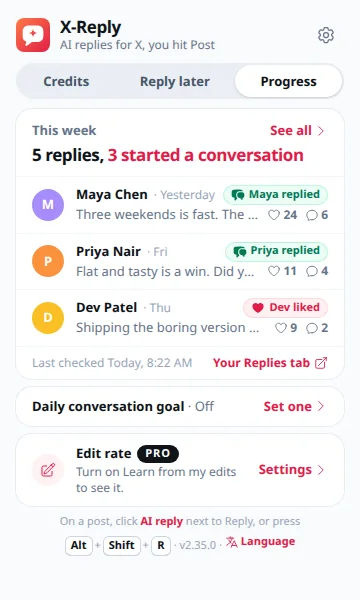
- 3The popup’s Progress tab sums up your week, “14 replies, 4 started a conversation”, with your top 3.
- 4With Pro you also see who answered or liked each reply, with its likes and replies.
- 5Settings › My replies lists them all (this week, 30 days, all), turns the log off or clears it.
See it in action · 0:11On a demo X page with made-up people. Nothing is posted.
- Open the X-Reply popup
- Progress counts your replies this week
- See which of your replies got answers
If something goes wrong
- Likes and replies show 0
- X-Reply only knows what X showed on pages you opened. Open your profile’s Replies tab to update them.
- A reply is missing
- Only replies posted from an X-Reply draft, with X’s own Reply button or Ctrl/Cmd+Enter, are noted.
Still stuck? Help and contact.